
Make equipment information easier to find, follow and keep up to date after handover.
Digital building records are most useful when the equipment list and its supporting documents are organised together. A folder full of files may contain the information a facilities team needs, but unclear names, broken links and conflicting versions can make it difficult to use.
Whether the records are held in a spreadsheet and folders or a dedicated database, the aim is the same: identify the equipment, connect it with the right documents and make the current information easy to find. This guide focuses on organising those records rather than choosing or developing software.
If a dedicated platform is being considered, see what building teams should look for in asset manager software.
Start with the information, then choose the system
Agree the asset references, required fields and document structure before moving files into a new platform. A database does not correct inaccurate source information by itself.
For general principles covering records, metadata and responsibilities, see the ISO 15489-1 records management overview.

Use consistent asset references
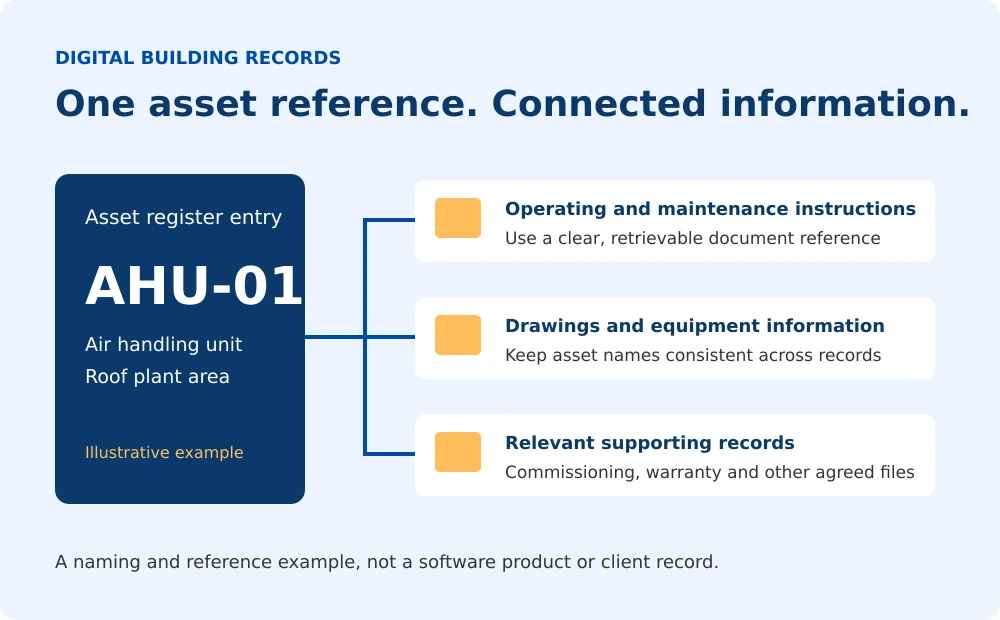
An asset reference should identify the equipment consistently across the register, relevant drawings and supporting records. If an air handling unit is labelled AHU-01 in one place and described differently elsewhere, the receiving team may need extra clarification before using the information.
Agree the naming convention with the project team. Where references repeat across separate buildings or systems, make the location and wider identification clear so that two different assets are not mistaken for the same item.
For a definition of the register itself and its typical fields, see what a building asset register includes.
Agree a practical folder structure
The structure should reflect the project requirements and how the receiving team will find information. A client may already have an approved template. Where no structure has been specified, agree a clear arrangement before compiling the final package.
| Information group | Typical contents |
|---|---|
| Asset register and index | The current equipment list and references to the supporting information. |
| Operating and maintenance information | Relevant system instructions and manufacturer guidance. |
| Drawings and schedules | Supplied project drawings and equipment schedules. |
| Supporting records | Relevant commissioning, test, warranty and other agreed documents. |
| Earlier issues | Superseded material retained under the agreed arrangements, clearly separate from current information. |
This is an example grouping, not a universal handover specification. Avoid unnecessary folder depth and give each document a clear place in the agreed structure.
Give files clear, consistent names
A useful file name helps the reader recognise the equipment or system, the document type and the issue. Use the project’s required naming convention where one has been supplied.
Illustrative file name
AHU-01_Manufacturer-Manual_Rev-02.pdf
The reference identifies the equipment, the description identifies the document and the revision distinguishes the issue. Use this only as an example; the project’s agreed convention takes priority.
Avoid unclear names such as “final-new-latest.pdf”. Do not rename source documents in a way that removes important identifiers, breaks references or obscures which revision was supplied. Where original names need to remain intact, use the index to explain their purpose.
Connect each asset to the right supporting documents
The register can contain a document reference or a link to the relevant information. A reference should be specific enough for the reader to locate the file or manual section. Links should be tested using the package and access arrangements that the client will actually receive.
- Check that each reference points to the correct equipment or system.
- Use documents that apply to the installed model and agreed project scope.
- Identify missing information for the responsible project party to confirm.
- Check that links do not depend on access to someone’s personal computer.
One manufacturer manual may apply to several assets. It can be referenced from more than one entry where appropriate, rather than creating uncontrolled copies of the same file.
The O&M manual provides the operating and maintenance information; the register and index help the reader locate it.
Keep versions and changes under control
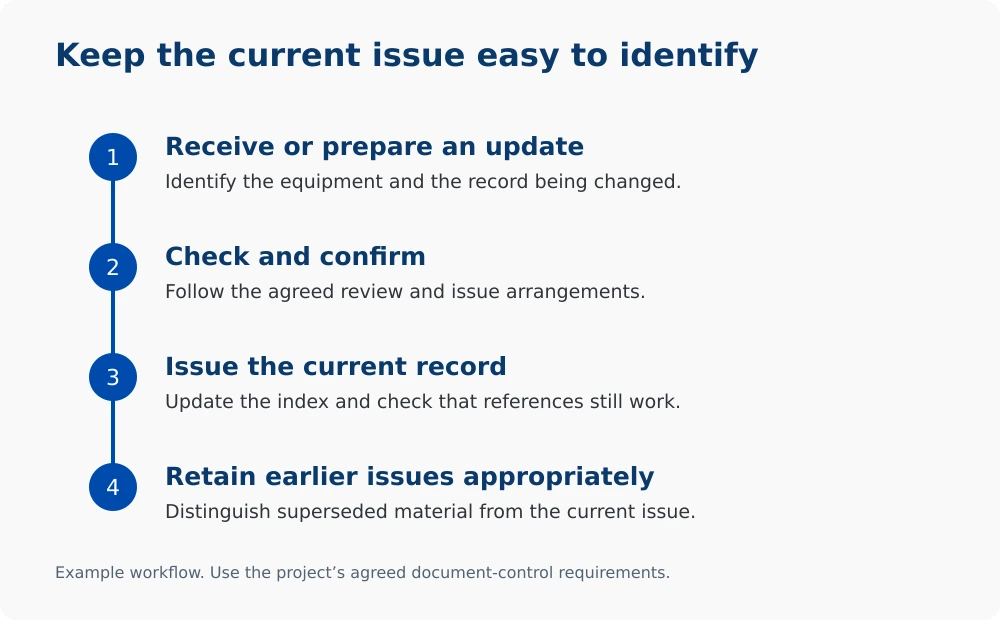
Assign responsibility for checking and issuing updates. The team should be able to identify the current register and supporting documents without comparing several files called “final”.
When an update is accepted under the project’s agreed process, update the relevant index or references and distinguish the superseded issue. Keep earlier material or change records where required by the client’s arrangements.
Equipment replacement may affect more than one file. The asset entry, manufacturer information, relevant drawings and other affected records should be considered together by the responsible team.

Agree who can view and update the records
The building owner or responsible management team should decide who needs access and who can make changes. Those arrangements should cover the storage location, responsibility for updates and how the current issue is shared.
Digital storage alone does not guarantee security or reliable backups. The organisation responsible for the chosen storage system should confirm appropriate access and recovery arrangements. Record preparation and ongoing platform administration are separate responsibilities.
Check the package the client will receive
Review the delivered copy, not only the working folder used during preparation. Useful checks include:
- The register and index open in the agreed format.
- Equipment references and descriptions are consistent.
- Supporting documents can be found from their references or links.
- The intended receiving team can access the shared files.
- The current issue is clear and outstanding information is identified.
- Responsibility for maintaining the records after handover has been assigned.
These checks support usability. They do not replace the project’s technical reviews, required approvals or confirmation of the underlying information by the responsible parties.
How Master Manuals can help
Master Manuals prepares building asset registers and handover documentation using information supplied by the project team. We organise the agreed equipment details and document references around the client’s requirements.
Explore our Asset Register preparation service for support compiling the record. Database development, software implementation and ongoing system administration are separate from the preparation service described here.
Frequently asked questions
Do digital asset records need a dedicated database?
Not always. A spreadsheet and organised document folders may meet the agreed requirements. The format should suit the client, the scale of the information and how it will be maintained.
Should every asset have a separate copy of each document?
No. Where one document applies to several assets, clear references can connect those assets to the relevant information. Check that the document applies and remains accessible.
What should happen when a document is updated?
Follow the agreed review and issue process, update affected references and distinguish the superseded issue from the current record.
Who maintains the records after handover?
The building owner or responsible management team should assign this responsibility and arrange updates when the equipment or supporting information changes.
Preparing equipment records for handover?
Share the client’s required template, available equipment information and handover date so we can review the documentation scope.